
POS Hardware and Peripherals Checklist for Retail and Restaurant Integrators
A reliable POS installation is a set of connected components. Use this checklist to align the terminal, ports, peripherals, environment and service access before requesting a quotation.
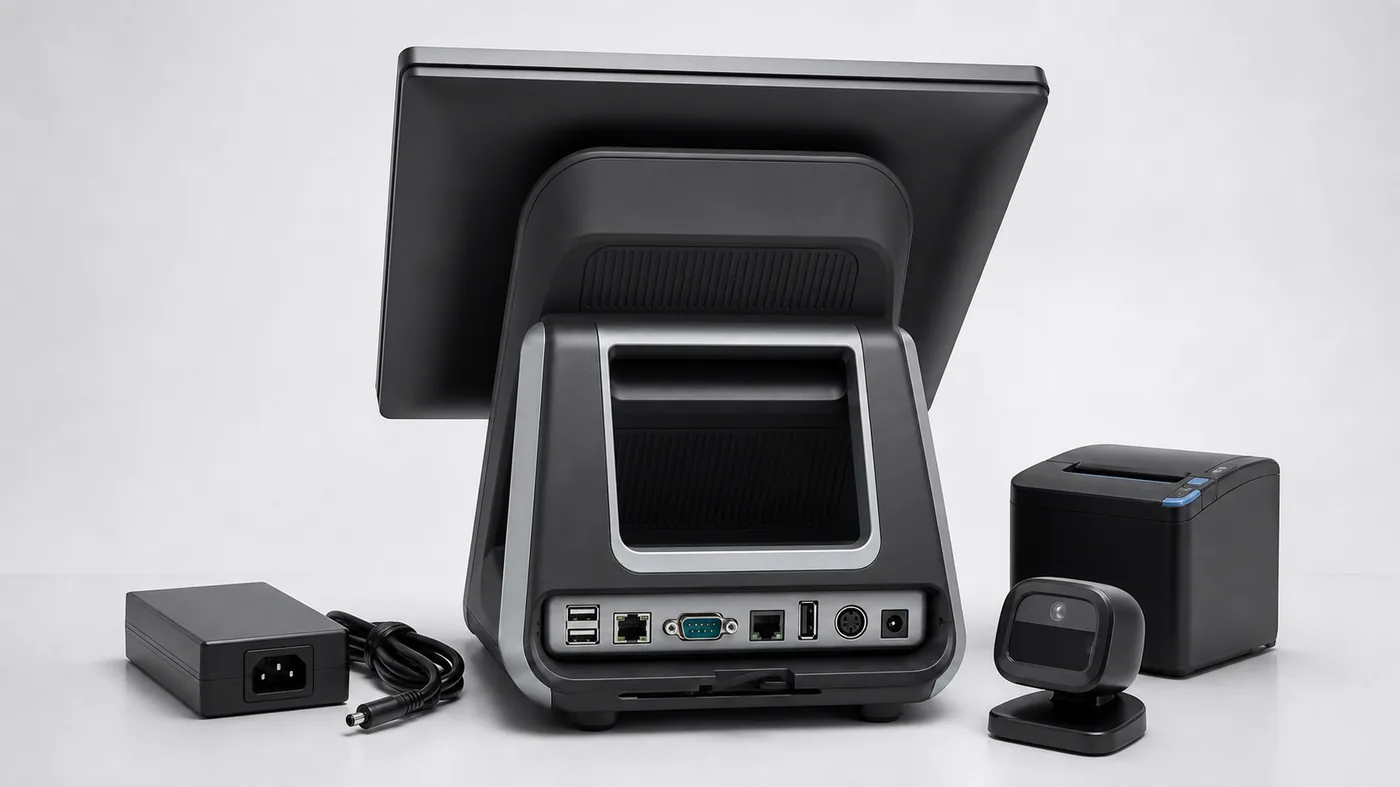
Integrators often search for touchscreen POS terminals, countertop POS terminals or a broad “POS hardware and peripherals” package. The useful comparison is not the number of accessories listed; it is whether the configuration matches the site and software workflow.
1. Terminal and display
Record screen size, touch technology, brightness, processor, memory, storage, operating system, stand and mounting method. If a customer display or dual-screen setup is needed, specify it separately.
2. Ports and connectivity
Create a port map for USB, serial, LAN, cash drawer, audio, Wi-Fi and Bluetooth. Ask which ports are available on the selected configuration and how cables exit the enclosure.
3. Peripherals and interfaces
List scanner, receipt printer, cash drawer, customer display, payment-terminal bracket, scale or label printer. For each one, define connection type, placement, power and whether the device is included in the quote.

4. Site and service conditions
Note counter dimensions, temperature, dust or moisture exposure, customer reach, mounting, power supply, packaging and replacement expectations. For kiosks, include service-door access and printer or scanner maintenance space.
5. Software handoff and test responsibility
Write down the interface, driver, operating system and test owner for every peripheral. The supplier can provide a Configuration and specification, but the integrator or POS software team should validate device discovery, printing, cash-drawer control, scanner behavior and recovery after a network interruption.
6. Packaging, replacement and rollout control
Ask for carton dimensions, protection, spare-part assumptions, replacement handling and whether the production configuration will match the Configuration. These details matter when a VAR or retail integrator is deploying the same POS hardware across several sites.
Use an Integrator Handoff Matrix
For each peripheral, create one row with the device name, connector, power source, mounting position, driver or protocol, test owner and replacement assumption. For example, a receipt printer row can include USB or Ethernet, paper access, driver environment, test owner and whether a spare unit is expected. Repeat the same method for the scanner, cash drawer, customer display, payment bracket and weighing interface.
This matrix turns a broad POS hardware and peripherals request into an implementation brief. It also helps an integrator distinguish a hardware limitation from a software or site condition.
Run the Integration Test in Stages
- Confirm the terminal boots with the agreed operating system, memory and storage.
- Verify that each peripheral is detected through the quoted interface.
- Test the normal transaction path: scan, calculate, print, open the drawer and complete the network handoff.
- Test a simple failure path such as a disconnected scanner, paper warning or temporary network interruption.
- Record the exact model, driver, cable, software version and recovery behavior used in the Configuration.
Staged testing makes the Configuration useful for a rollout decision. It does not make the supplier responsible for the buyer’s application, local payment rules or final certification.
Normalize the Quote for a Multi-Site Rollout
When several sites are involved, compare more than the terminal price. Record included accessories, carton protection, spare parts, replacement lead time, cable lengths, mounting hardware and whether the production configuration will match the Configuration. A slightly higher quote may be easier to deploy if the peripherals and service conditions are clearly defined.
Ask for separate lines for the terminal, each peripheral, optional modules, packaging, Configuration charges and any one-time customization. This prevents a low base price from hiding the items that the installer must purchase later.
Integrator Failure Modes to Resolve Early
Common problems include using a generic port list instead of the actual model port map, testing a different printer from the one quoted, forgetting service access behind a counter, and assuming that a driver works because the device powers on. Another risk is allowing a selected configuration to change without updating the rollout brief.
Keep a versioned configuration sheet and mark every field as confirmed, pending or buyer-side test. That simple discipline gives retail and restaurant integrators a clearer handoff between purchasing, site preparation and software validation.
Evidence Package for a Rollout Decision
Before approving a multi-site POS hardware rollout, ask for a configuration-specific evidence package: front and rear photos, port map, peripheral list, operating-system information, driver or protocol notes, Configuration test results, carton dimensions and replacement assumptions. The package should reference the exact model and revision used in the quote.
Keep generic marketing images separate from evidence. A product photo can explain the category, but it cannot confirm a port, accessory, driver or service clearance that is not visible in the quoted configuration.
Integrator request format
Application: retail / restaurant / grocery
Terminal: display, CPU, RAM, storage, OS
Port map and network requirements:
Peripherals and connection types:
Mounting and site dimensions:
Configuration, rollout quantity and destination:
Software test and open compatibility questions:
Tesp helps overseas B2B buyers organize POS hardware options, configuration reviews and quotation requests. If you have a port map or rollout brief, send it through the Tesp contact page. We provide hardware sourcing and order preparation; the buyer’s software team remains responsible for integration testing.