
POS Hardware from China: 5 Questions to Confirm Before Requesting a Quote
A low quote from a POS hardware supplier is useful only when every supplier is quoting the same product scope. Before you compare POS hardware from China, confirm the configuration, interfaces, peripherals, Configuration scope and delivery assumptions in writing.

Overseas POS dealers, POS-focused ISVs, retail technology providers and restaurant solution integrators often begin with a short message such as “Please quote a POS terminal.” That request sounds clear, but it leaves too many variables open. One supplier may quote a complete countertop system while another quotes only a bare computer board and display. The difference appears later as missing accessories, an unsuitable port map, a failed software test or an unexpected freight cost.
This guide expands the common supplier-audit approach into five practical questions. It also covers related searches such as countertop POS terminals, POS hardware quote, self checkout kiosk for sale and price computing scale with printer, because these products often share the same quotation problems.
1. Are you requesting a complete system or a base unit?
Define what “POS terminal” means in your request
Ask whether the quotation includes the display, computer, stand, power adapter, operating system, storage, mounting parts, packaging and user-facing accessories. A countertop POS terminal can be supplied as a ready-to-use set, a display-and-computer combination or a base unit that still needs a stand and power solution.
Use the product page for POS terminals as a starting point, then ask the supplier to list every included item line by line. Do not compare a “unit price” until you know whether it is a complete configuration.
This same rule applies when searching for a self checkout kiosk for sale. A kiosk may include an enclosure and screen but exclude the barcode scanner, receipt printer, payment-terminal bracket or bagging-area hardware. If the item is intended for grocery or retail use, describe the full transaction flow rather than relying on the word “kiosk.”
2. What is the exact POS terminal configuration?
Record the specification, not just the model name
For each option, confirm screen size, touch technology, brightness, processor family, memory, storage, operating system, network options and power input. If the same enclosure is offered with several CPU, RAM or storage choices, request each combination as a separate quotation line.
Also ask for a current specification sheet. Product photos and marketplace titles are not reliable evidence of the configuration that will ship. A buyer may need Windows IoT, Android or another operating system image, but the software team should still test the actual Configuration and version.
For a POS hardware quote, ask the supplier to identify confirmed information, optional information and items that still require engineering review. This simple separation makes it easier to compare suppliers and prevents an assumption from becoming an unplanned change order.
3. Which ports and interfaces are included?
Create a port map before you approve a Configuration
List USB, serial, LAN, cash drawer, audio, Wi-Fi and Bluetooth requirements. If a barcode scanner, receipt printer, payment terminal, customer display or scale must connect to the system, specify the interface and location. A port visible in a photo may not be included in every configuration.
Ask whether the ports are exposed on the rear, side or underside, and whether the cable exits fit the counter or kiosk enclosure. A technically compatible peripheral can still be impractical if the cable route blocks service access.
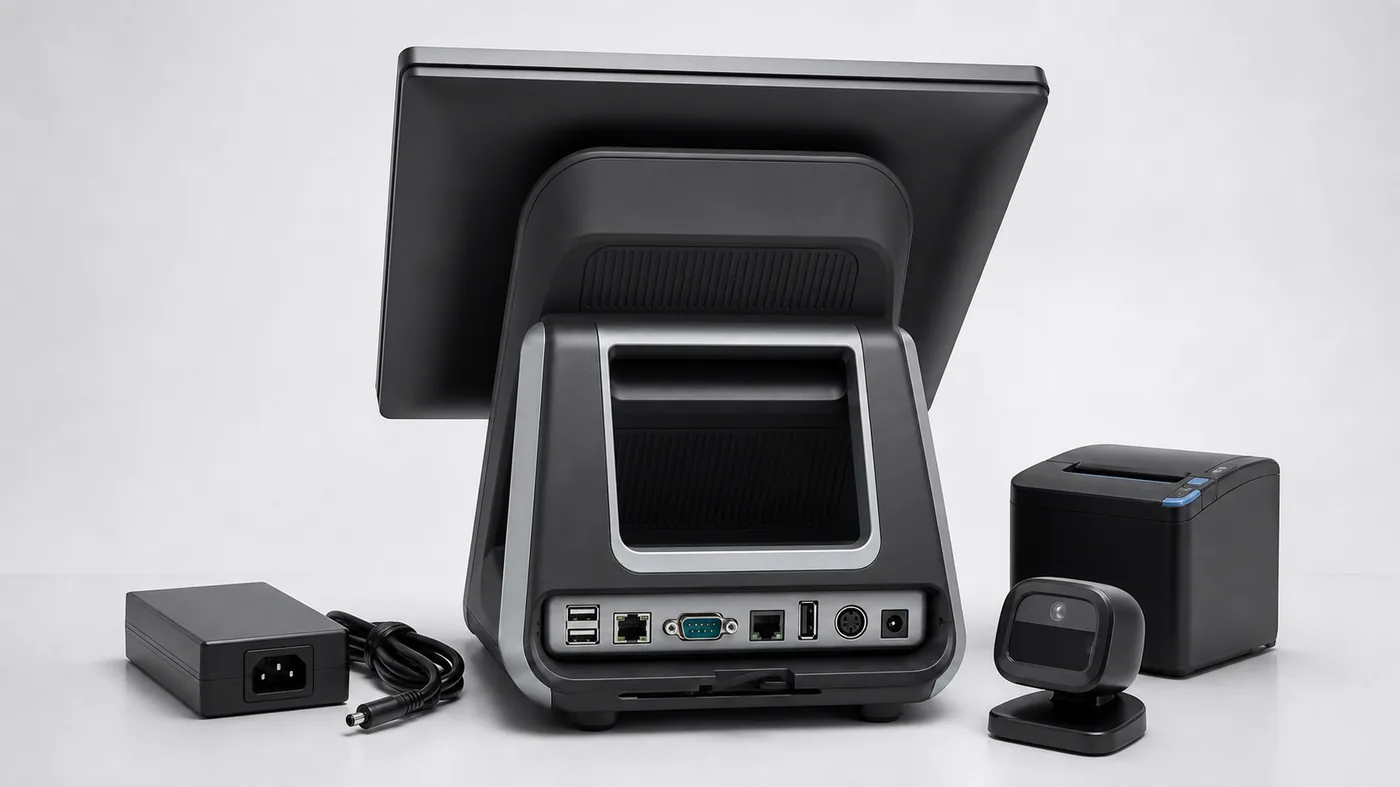
Integrators should send a simple interface table with the request: peripheral, connector, power requirement, mounting position and test responsibility. This is especially important when a POS-focused ISV needs to validate drivers or when a retail technology provider is adapting an existing software stack.
4. Which peripherals and workflow modules are required?
Separate the hardware list from the workflow
List the barcode scanner, receipt printer, cash drawer, customer display, payment-terminal space, weighing interface and label printer. For self-service, add scanner position, receipt access, assistance call, exception handling and service-door requirements.
For grocery projects, a price computing scale with printer may be part of the workflow. Confirm weighing range, display, label or receipt format, communication method and the exact model. Local metrology, labeling and payment rules must be verified by the buyer’s own technical and compliance teams.
Do not ask for “all accessories” as one vague line. Ask for each peripheral separately, including whether it is included, optional, supplied by another party or only shown for reference. This makes a China POS hardware comparison more useful and reduces the risk of receiving a quote that looks complete but cannot be installed.
5. What will the Configuration and delivery scope actually prove?
Use the Configuration to answer a project question
Define the Configuration model, accessories, operating system image, labels, packaging, freight responsibility and test period. A Configuration should answer an integration, mounting, peripheral or workflow question; it should not be treated as proof that every future configuration will be identical.
Ask about lead time, repeat-order assumptions, carton dimensions and replacement handling. Keep supplier-confirmed facts separate from software compatibility, local certification, import requirements and payment compliance, which remain the buyer’s responsibility.
When the project includes more than one product, send one structured brief rather than several disconnected messages. The same method can cover countertop POS terminals, a self-checkout kiosk and a price computing scale with printer while preserving a clear record of what has and has not been confirmed.
How to Normalize Two Supplier Quotes
Suppose one supplier quotes a complete countertop POS terminal and another quotes a lower-priced base unit. Put both replies into the same comparison row before drawing a conclusion. Record the model, screen, CPU, RAM, storage, operating system, printer, scanner, cash drawer, power adapter, carton, required quantity and delivery basis. Mark each field as included, optional, pending or not offered.
This process exposes the difference between a low unit price and a lower total project cost. It also helps a buyer identify whether a supplier is proposing a real alternative or simply omitting the parts needed for installation.
How to Review Supplier Evidence
Evidence should match the exact configuration being quoted. Ask for a current specification sheet, rear-port photo, accessory list and a short video when the printer, scanner, scale or payment-device position affects the decision. If the image shows a different enclosure or port panel, record it as reference only.
For a Configuration request, define what the buyer will test: startup, peripheral discovery, printing, scanner response, cash-drawer trigger, network recovery, mounting or cable routing. A clear test question is more useful than asking for a Configuration without an acceptance point.
Five Red Flags Before Approving a POS Hardware Quote
- The price does not say whether the operating system or power adapter is included.
- The quoted model number changes between the specification sheet and the commercial offer.
- Peripheral photos are shown, but the quotation does not list the connection or mounting method.
- Configuration lead time is given without carton size, shipping basis or repeat-order assumptions.
- Software compatibility, certification or local approval is described as guaranteed without buyer-side testing.
Resolving these points before payment reduces re-quotation, installation changes and avoidable delays. It also gives the buyer a written record of what the supplier actually agreed to provide.
How to write a quotation-ready inquiry
Product: countertop POS terminal / self-checkout kiosk / scale
Target use: retail, restaurant, grocery or other
Configuration: screen, CPU, RAM, storage, operating system
Interfaces: USB, serial, LAN, cash drawer, Wi-Fi, Bluetooth
Peripherals: scanner, printer, drawer, display, payment space, scale
Quantity: Configuration and estimated repeat order
Destination: country and delivery city
Questions: Configuration contents, lead time, packaging, freight and open items
Tesp can help overseas B2B buyers compare product options, organize configuration questions and prepare a quotation-ready brief. Tesp is a Qingdao-based POS hardware sourcing and project-follow-up contact, not a factory, software testing team, certification body or customs broker. Your technical team should validate software compatibility and your local advisors should confirm regulatory requirements.
If you already have a model, configuration sheet or target quantity, send it through the Tesp contact page. We can then separate confirmed requirements from open questions before a supplier comparison.