
Self-Checkout Kiosk Hardware for Retail and Restaurant POS Projects
Tesp supplies self-checkout kiosk hardware from China for overseas POS dealers, VARs and retail technology providers. Compare touchscreen, scanner, printer and payment-terminal mounting requirements for your project. Send your operating system, installation format, quantity and destination to request hardware options and a quotation.
Explore the Z3 kiosk to compare Windows and Android configurations for your checkout or self-ordering project.
Retail Self-Checkout
Choose hardware around product scanning, receipt printing and payment-device placement.
Windows or Android
Match the platform to your application, drivers and peripheral requirements.
Installation Format
Review floor-standing, wall-mounted or countertop layouts for the selected kiosk.
Restaurant Self-Ordering
Review touchscreen ordering and printer requirements in the section below.
Choose Hardware for Retail Self-Checkout or Restaurant Self-Ordering
A self-checkout machine and a self-ordering kiosk can share a touchscreen structure, but their hardware requirements differ. Start with the customer workflow before comparing modules and installation options.
For project planning, buyers may also compare self-checkout kiosk cost, scanner integration, retail workflow and countertop or floor-standing format before requesting a configuration review.
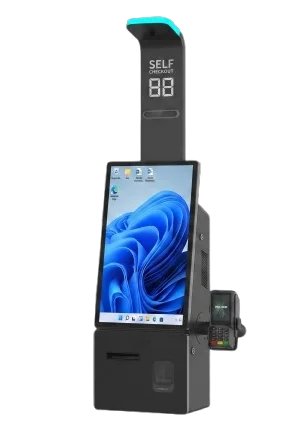
Retail Self-Checkout Kiosk Hardware
For retail checkout, review how customers scan products, read prompts, collect receipts and use the selected payment device. The scanner position, printer access and payment-terminal bracket should suit the store layout and checkout application. Confirm the required modules on the selected hardware rather than assuming every device is included.
Retail POS Hardware
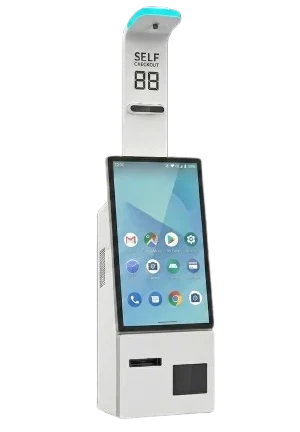
Restaurant Self-Ordering Kiosk Hardware
For restaurants and QSR projects, review touchscreen menu interaction, order submission, ticket or receipt printing and payment-device placement. A self ordering kiosk for restaurants requires a hardware configuration that suits the buyer's application. Tesp supplies hardware; ordering software, payment services and local installation are not included.
Restaurant POS Hardware
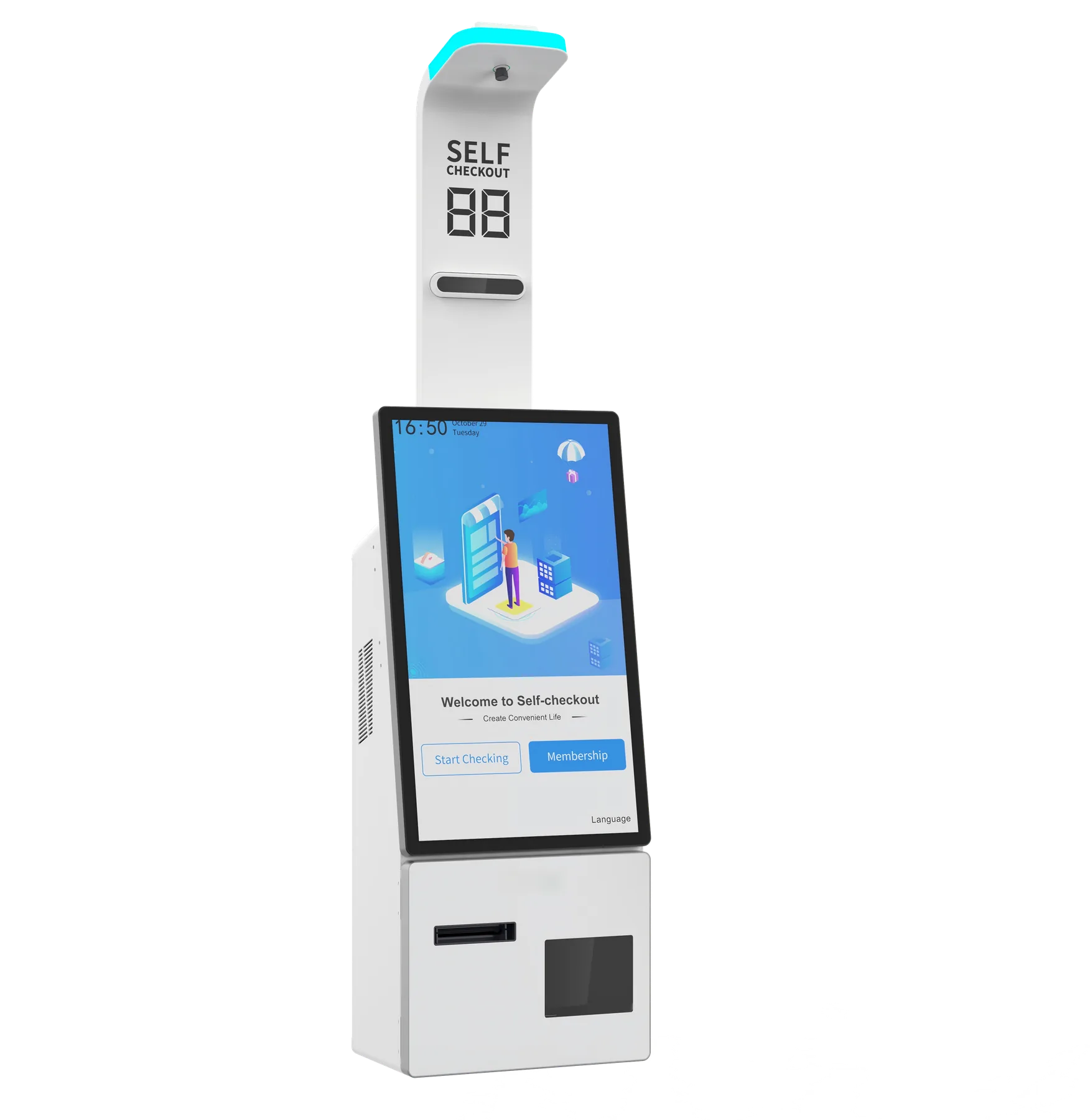
Z3 Self-Checkout Kiosk
Start with a 21.5-inch Full HD touchscreen, floor stand with PE tray, 58 mm receipt printer and 2D scanner. Choose Z3W Windows or Z3A Android, then select your screen and mounting upgrades.
DISPLAY21.5-inch standard; 27-inch upgrade
OPERATING SYSTEMAndroid / Windows
INSTALLATIONFloor stand + PE tray standard; wall / countertop options
Windows and Android Kiosk Platform Options
Choose Windows kiosk hardware or Android kiosk hardware according to your application and required peripheral drivers. Confirm the operating-system version, processor, memory, storage and interfaces for the selected configuration before requesting a sample. For platform research, see our Android POS terminals and Windows POS terminals.
Windows Kiosk Hardware
Suitable for projects that depend on Windows applications, peripheral drivers or a familiar PC hardware environment. Confirm the Windows edition, processor level, memory, storage, ports and device drivers on the selected model.
Android Kiosk Hardware
Suitable for APK-based self-service projects that need a focused touchscreen platform. Confirm the Android version, processor, memory, permissions, SDK requirements, peripheral interfaces and firmware policy before sampling.
What to Confirm Before Requesting a Self-Checkout Kiosk Sample or Quotation
Send the requirements you already know. The most useful starting points are the workflow, operating system, installation format, required scanner and printer, payment-device model, quantity and destination. Open details can be reviewed before a quotation.
Operating System & Software
Windows or Android, application type, required version and installation restrictions.
Screen & Enclosure
Screen size, portrait or landscape layout, touch requirement and service-door access.
Scanner & Input
Barcode types, screen-read requirements, scanner position and USB or serial input mode.
Printer & Paper Access
Paper width, cutter, paper loading method, service access and expected print workflow.
Payment & Optional Modules
Payment-device model, bracket size, cable route and any scale, camera or RFID requirement.
Installation & Quantity
Floor, wall or countertop format, sample quantity, estimated batch size, destination and timeline.
Self-Service Kiosk Platform Configuration
Compare self-checkout hardware options by workflow, operating system, screen format, scanner, printer, payment-device position and cabinet configuration. When you request model availability or a quotation, share the required setup, quantity and destination, and review the kiosk barcode scanner integration guide for the scanner acceptance questions.
| Configuration Area | Available Range | Common Use |
|---|---|---|
| Operating system | Z3W: Windows 11. Z3A: Android 11; Android 14 with RK3576 upgrade. | Windows / Android kiosk applications |
| Processor | Z3W: i3-1215U standard; i5-1235U upgrade. Z3A: RK3399 standard; RK3576 upgrade. | Select the software platform first |
| Memory & storage | Z3W: 8 GB / 128 GB M.2 SSD standard; 16 / 32 / 64 GB and 256 / 512 GB upgrades. Z3A: 4 GB / 32 GB eMMC standard; 8 / 16 GB and 64 / 128 / 256 GB upgrades. | Standard and upgrade configurations |
| Screen | 21.5-inch 1920 × 1080 capacitive touchscreen as standard; 27-inch option. | Retail self-checkout / restaurant self-ordering |
| Installation | Floor stand with PE tray as standard; wall-mounted or countertop installation options. | Fit your available store space |
| Printer, scanner and payment mounting | Built-in 58 mm receipt printer and 2D scanner as standard; optional payment-terminal bracket and status light. | Receipt printing / product scanning / payment-device positioning |
Self-Service Kiosk Modules and Project Checks
Integrated modules vary by kiosk model and supplier. Use this table as a project checklist rather than a guaranteed standard configuration.
| Kiosk Module | What to Confirm | Common Project Role |
|---|---|---|
| Touch Display | Confirm screen size, portrait or landscape orientation, resolution, touch technology, brightness and front-bezel requirements. | Product Selection Order Entry Customer Guidance |
| Computer & OS | Confirm Windows or Android, processor level, memory, storage, network options, required ports and the expected software workload. | Kiosk Application Peripheral Drivers Remote Support |
| Barcode Scanner | Confirm supported barcode types, screen-read requirement, scanner position, trigger behavior and USB or virtual COM input mode. | Product Scanning Coupon / QR Loyalty Input |
| Thermal Printer | Confirm paper width, cutter, paper loading method, access door, sensor behavior and command or driver requirements. | Receipt Printing Order Ticket Service Access |
| Payment Mounting | Confirm the payment-device model, dimensions, bracket type, screw positions, viewing angle, cable route and maintenance clearance. | Card Terminal PIN Pad QR Payment Device |
| Enclosure & Installation | Confirm floor, wall or countertop format, anchoring points, service doors, locks, power entry, ventilation and installation accessories. | Floor Stand Wall Mount Countertop |
| Optional Modules | Confirm any scale, camera, RFID or other module, including physical space, interface, driver and project-specific compliance requirements. | Scale Camera RFID |
From Kiosk Requirements to a Quotation
For quotation preparation, review the self-checkout kiosk cost and quote breakdown. For sample preparation, see Configuration Review.
Share the Workflow
Tell us whether the hardware is for retail self-checkout or restaurant self-ordering.
Select the Configuration
Review the platform, screen, installation format and required modules.
Confirm Sample Details
Confirm the selected configuration, included accessories and available sample evidence.
Request a Quotation
Send quantity and destination for supplier-confirmed commercial details.
Best-Fit Self-Service Kiosk Projects
A Practical Fit
- Self-service kiosk solution providers reviewing hardware for customer projects
- POS resellers and regional distributors adding kiosk product lines
- Retail and restaurant technology providers coordinating self-service deployments
- Software teams that need sample hardware and supplier-side module follow-up in China
Outside Tesp’s Scope
- Self-checkout or self-ordering software development and debugging
- Payment processing, acquiring services or guaranteed payment-device approval
- Local installation or on-site maintenance outside China
- Certified laboratory testing or regulatory approval
Frequently Asked Questions About Self-Service Kiosk Hardware
What is the difference between self-checkout and self-ordering kiosk hardware?
Retail self-checkout usually requires product scanning, receipt printing and payment-device placement. Restaurant self-ordering focuses on touchscreen ordering and ticket or receipt printing. The final modules depend on the buyer’s application and the selected kiosk configuration.
Can I order one kiosk sample before a larger order?
Some kiosk models may support a sample unit before a larger order. Sample availability, pricing, lead time and included modules depend on the selected structure, required configuration and supplier policy.
What should I send for a self-checkout kiosk quotation?
Send the retail or restaurant workflow, Windows or Android requirement, screen and installation preferences, scanner and printer needs, payment-device model, quantity and destination. If you already have a layout or hardware specification, include it with your request.
What should I confirm before requesting a self-service kiosk sample?
Confirm the use case, operating system, screen size, scanner, printer, payment-device mounting, cabinet format, quantity and destination market. This allows us to check suitable available configurations and sample options.
Can Tesp test our kiosk software with the scanner and printer?
Where practical, Tesp can load a client-provided APK, installer or checklist on a sample unit, observe basic opening and module response, and share raw photos, videos or notes. Tesp does not debug software or provide final compatibility approval; that decision remains with the client’s technical team.
Can the kiosk carry our logo, color and packaging?
Logo, label, boot screen, enclosure color and packaging requests can be discussed with the supplier. Feasibility, MOQ, cost and lead time depend on the selected kiosk structure and the depth of customization.
Request Self-Checkout Kiosk Hardware Options
Send your self checkout hardware requirements to Tesp. Include the intended workflow, operating system, installation format, required modules, quantity and destination. We will review the hardware options and the details needed for a quotation. You can list any points that are still undecided.